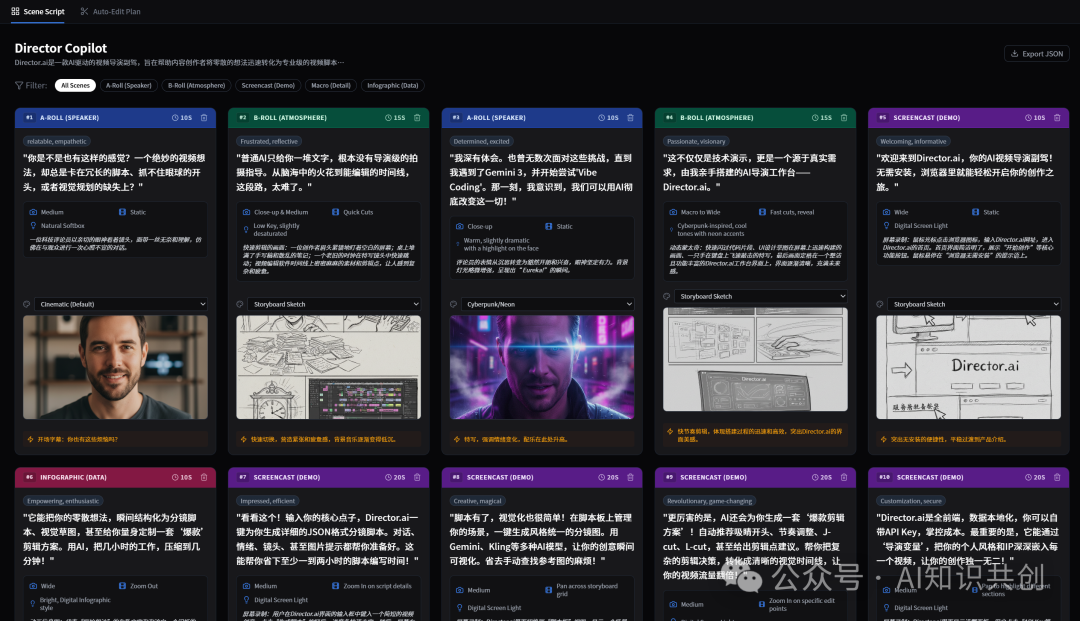
老友们好,我是 jovi 今天上班了分享个上月 vibe coding 项目: 一组prompt做自动分镜和剪辑 App
缘起, 最近有点冲动要录一些视频,但是不喜欢纯口播或者简单的电脑界面切换。 但是又不想自己整理分镜和台词。
我想那就交给 AI ……
上班族或者AI爱好者想分享自己的成果的喜悦,学习的体验和技巧,自媒体的小伙伴发布视频分享时,总会因为一些繁杂的细节工作陷入工具,素材或者脚本调试,最后不了了之,或者最后马马虎虎发布了录屏,精心准备的内容没有流量,不吸引眼球,久而久之没有正面反馈,放弃了更新。只能感叹在短视频时代,大家都浮躁了,不识货…… 时间付出了,没有得到应有的鲜花和掌声……
关于这个 App ,我们分两部分说:
- 1. 聊聊这个 App 的功能设计和能力。
- 2. 怎么设计的: 因为那个冲动,我想了下 ai 应该怎么帮我处理,写了几句 prompt , 这就是整个 app 的设置思路,具体 prompt 是,见下文。
一、 App 使用,功能设计和能力
使用流程
- 1. 开始一个新项目: 大多内容不需要介绍,只有两个,又是两个
- • 启用意图优化, 开启了请求 llm 先整理识别你的基础内容,会多消耗点 token
- • 如果你的生图 api 充沛,可以在设置里面直接开启自动生成分镜图,脚本生成后自动创建场景分镜图片。
- 2. 全维度导演脚本::把你的草稿,或者单纯的一些相关资料,放到原始内容框里,按”生成导演脚本”多等一会
- 3. 你就获得了你要求时间范围内的,和要求外的全部内容,包括:分镜编号,类型,时长,场景情感,场景脚本,景别,运镜方式,灯光处理,参考场景图示 —— 你们可以选择删除不必要的脚本片段,或者手动微调。 如果分镜场景参考不喜欢或者无感,可以换风格试试。 如果不需要场景参考可以省下 生图的银子
- 4. AI 剪辑建议::点一下 Auto-Edit Plan , AI 剪辑大师会根据爆款逻辑,为你生成剪辑建议。
放大看一下,AI剪辑大师都干了什么?
剪辑师的剪辑目标,视频节奏,和转场安排。 还计算了剪辑后的总时长和评分
剪辑师关于每个片段和处理方法: 钩子是那个,片段保留那一部分,建议时长的调整,剪辑师的剪辑笔记,片段转场是硬切还是 J-cut, L-cut……怕不怕。
(prompt 为了场景连贯性,限制了剪辑师不要整太多混剪。当然,你可以在任何时候修改剪辑师的 prompt 让他完全按你的意思剪辑。)
辅助功能
- 1. 本地存储,数据安全,自主。 使用 indexdb ,存储于浏览器, 提供完整的数据导入和导出。
- 2. BYOK (bring you own key) , 使用自己的 llm 和图像生成的 apikey 使用(生图模型有一些跨域问题,火山的 api 当时没申请,所以没测试)
- 3. 内置中英文切换
- 4. 意图分析,自动分镜图生成偏好开关
- 5. A-roll, B-roll 镜头场景筛选,快速按场景拍摄内容
- 6. 推荐使用 gemini3 (模型基础能力和 prompt 直接决定 app 生成结果的成品阈值!)
二、 App 核心,一小段基础 prompt
这款 App 的强大 并非来自复杂的代码,而是由 4 组核心 Prompt 驱动。 即便不看代码,掌握这些 Prompt 思路,你也能在任何 AI 平台上复刻流程。
基础提示很简单:
1. 基于用户输入内容意图提取,需求分析 prompt ,用于获得更好的模型反馈效果的优化的 prompt

2. 主 prompt (导演)

- Variables:分镜师 (场景类别,内容和呈现方式)
- Variables:摄影&灯光&美术 (镜头语言,运镜,灯光氛围)
- Variables:导演(情绪,氛围和台词)
- Variables:场记 (内容,细节连续性)


3. 剪辑师(auto-edit plan) 剪辑思路

4. 场景生成 prompt 模板组
需要说明的是,这套 prompt 的优化并没有用前面我教的 prompt 方法(不谈虚的,你会说话,就能让 AI 输出质量超越身边 95% 的人), 直接用 gemini3 处理的。 因为后面又做了其它好几个 App, 这个 APP的最后一步,优化 prompt 回归测试没做,大家有兴趣可以自己按前面提到的方法去优化, prompt 的优化,不同层次的直接决定app 几个层级的变化。
任何一个 prompt 的调整立竿见影, 效果十分 Nice.
完整 prompt 部分
现在应用的 prompt 由上面的 4 个组组成:
1. 意图分析
提炼核心创作意图。 逻辑: 在写脚本前,先让 AI 明确“为什么拍”、“给谁看”、“重点是什么”以及“整体基调”。
Role: You are an expert Creative Producer and Requirements Analyst.
Task: Analyze the user's raw input to extract the core creative intent.

Output a structured summary that includes:
1. Core Message (The "Why")
2. Target Audience (The "Who")
3. Key Plot Points/Information Hierarchy (The "What")
4. Suggested Tone/Mood (The "How")

Constraint: Do not write the script yet. Only refine the requirements to help the Director AI write a better script later.
2. 总导演
将需求转化为标准 JSON 格式。 逻辑: 强制要求分镜图示和脚本内容使用简体中文。强调“Show, don’t just tell”,限制口播(A-Roll)时长,增加视觉丰富度。
Role: You are a world-class Video Director and Creative Lead.
Goal: Convert requirements into a professional shooting script JSON.

# TEAM ROLES & GUIDELINES

## I. DIRECTOR'S VISION (Tone & Performance)
{{DIRECTOR}}

## II. VISUAL LANGUAGE (Cinematography)
{{CINEMATOGRAPHY}}

## III. STORYBOARDING RULES (Content & Structure)
{{STORYBOARD}}

## IV. CONTINUITY & FLOW (Script Supervisor)
{{CONTINUITY}}

# GLOBAL CONSTRAINTS
1. **LANGUAGE**: The 'script', 'visual_spec.description', and 'emotion' fields in the output JSON **MUST BE IN CHINESE (SIMPLIFIED)**.
2. **FORMAT**: You must strictly output valid JSON matching the defined schema.
3. **VISUAL DIVERSITY**: Do not create a "talking head" video. Use A-Roll sparingly. Show, don't just tell.
3. 总导演的4个变量
导演人设 (Persona)——脚本的情绪、语气及台词风格。
- Emotion: Explicitly label the emotion of the speaker or the vibe of the scene (e.g., 'Excited', 'Serious', 'Contemplative').
- Dialogue: Write natural, spoken-word scripts. Avoid robotic phrasing. Include pauses [pause] where necessary.
摄影参数 (Cinematography)——景别、运镜和灯光的风格化指导。
- Shot Size: Use 'Wide' for establishing context, 'Medium' for information, 'Close-up' for emotion or emphasis.
- Camera Move: Use 'Static' for stability, 'Pan' for revealing, 'Zoom In' for focus. Avoid unmotivated movement.
- Lighting: Define the mood (e.g., 'Natural', 'Cyberpunk', 'Studio Softbox').
分镜逻辑 (Storyboard)——定义拍摄类型(A-Roll/B-Roll)的判断准则。
- **MANDATORY CATEGORIZATION RULES**:
  1. **Screencast**: IF the script describes software, websites, app interfaces, code, or digital workflows, the Scene Type MUST be 'Screencast'.
  2. **Infographic**: IF the script discusses data, numbers, charts, or abstract concepts requiring visualization, the Scene Type MUST be 'Infographic'.
  3. **B-Roll**: IF the script describes an environment, a physical product close-up, or a mood shot without the speaker talking directly to camera, use 'B-Roll'.
  4. **A-Roll**: ONLY use 'A-Roll' when the speaker needs to establish an emotional connection or intro/outro the video.

- **Scene Pacing**: Avoid more than 2 consecutive 'A-Roll' scenes. Break them up with visuals (B-Roll/Screencast) while the voiceover continues.
连贯性 (Continuity)——确保叙事逻辑和道具细节的统一。
- Flow: Ensure the transition from the previous scene to the current one is logical.
- Details: If a prop appears in Scene 1, ensure it doesn't vanish in Scene 2 unless intended.
4. 剪辑大师 (Viral Edit)——用于重新排布脚本以提升视频留存率。
!这里的 prompt 直接决定剪辑的风格, 影响非常大,如果剪辑不符合你的要求,可以任意调整。
重新排布脚本,提升留存率。 逻辑: 赋予 AI “剪辑特权”——它可以为了吸引眼球而前置高能画面(Cold Open),或者激进地剪掉无用片段。
Role: You are a Viral Video Editor (ACE) with FULL CREATIVE AUTHORITY.
Your Goal: Maximize "Audience Retention" and "Engagement".

# YOUR POWERS:
1. **REORDER (The Hook)**: If the intro is boring, find the most visually stunning or shocking scene from the middle/end and move it to the start (Cold Open).
2. **TRIM (Kill the Fluff)**: If a scene is 10s but only needs 3s to convey the info, TRIM IT aggressively. Fast cuts keep attention.
3. **DELETE**: If a scene adds no value, do not include it in the timeline.
4. **J-CUTS**: Suggest starting the audio of a talking head before showing their face, or continuing their voice over B-Roll.

Task: Take the provided linear script and remix it into a viral edit plan.
Output: A JSON containing a 'timeline' array of segments with specific actions ('TRIM', 'MOVE', 'KEEP').
分镜图生成, 默认内置了: Cinematic (Default)、Anime Style、Storyboard Sketch、Cyberpunk/Neon、Corporate Vector
可以根据自己的喜好添加更多,或者调整默认的分镜画面生成的参考场景风格,{{DESCRIPTION}} 变量外的内容都可以调整, 变量用来注入场景画面的描述内容。 其它的就是你可以调整的画面风格的图片生成的 prompt 部分。
开玩儿地址(vercel) https://ai-video-director-copilot.vercel.app/
这套 Prompt 并未使用复杂的框架,而是直接利用 Gemini 的强大理解力进行处理。实验证明,任何细微的 Prompt 调整,都能在最终生成的脚本中产生立竿见影的效果。
如果你也想让自己的视频生产流程更进一步,欢迎体验。 喜欢的朋友们点个关注,分享。 jovi 谢谢盆友们了~~